How to Deposit to your Cambist Markets Account
Please note that you need to verify your account to be able to deposit funds.
You will then need to:
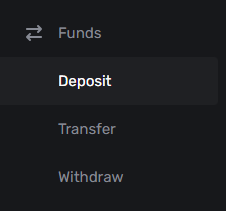
- Click on the ‘Funds’ tab and click on ‘Deposit’ from the down-down menu
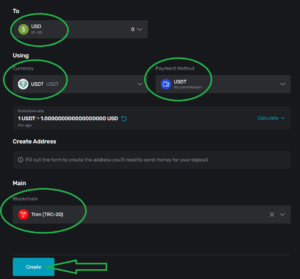
- Select the USD wallet
- Select the Currency to deposit
- Select the Payment Method
- Select the Blockchain network – it is very important that this network is supported by your crypto wallet provider and that you send the funds via the same network on their end
- Click ‘Create’
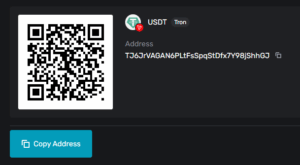
- You can either scan the QR code or copy the crypto address directly to your wallet provider for them to release your funds
Your deposit history and transaction status will display on the right-side of the Deposit tab.
Please always make a new deposit request for each transaction.
Crypto deposits are typically credited to your wallet with an hour. Please note, however, that there may occasionally be delays due to traffic on the Blockchain network, which is not within our control. All deposits will be available in your Cambist Markets wallet once three confirmations have been received.
Once you have received your deposit, you can follow the necessary guide(s) from the below:
- Click here to see how to create a TradeLocker account
- Click here to see how to create a CM Trader account
- Click here to see how to transfer funds from your Cambist Markets wallet to an existing trading account